Arrears & reminders
Collector chases unpaid dues so your treasurer doesn't have to. Two scheduled sweeps and a configurable notification system keep members informed — without ever dunning someone who has already paid.
When does an obligation become overdue?
Every obligation has a due date. After the due date passes, Collector waits out your grace period (set in Settings → Overdue grace (days)), and only then marks the obligation Overdue. Fulfilled obligations are never touched.
period end ──▶ due date ──▶ (grace period) ──▶ marked OVERDUE ──▶ overdue notification
The two reminder sweeps
| Sweep | When it fires | Notification event |
|---|---|---|
| Due reminder | Ahead of the due date, by your Due reminder lead (days) setting | Obligation due |
| Overdue sweep | After due date + grace period, for unfulfilled obligations | Obligation overdue |
Both run automatically on schedule. Both are credit-aware: a member whose obligation was fulfilled (including from parked credit) is skipped. Nobody who has paid gets a reminder.
Configuring the notifications
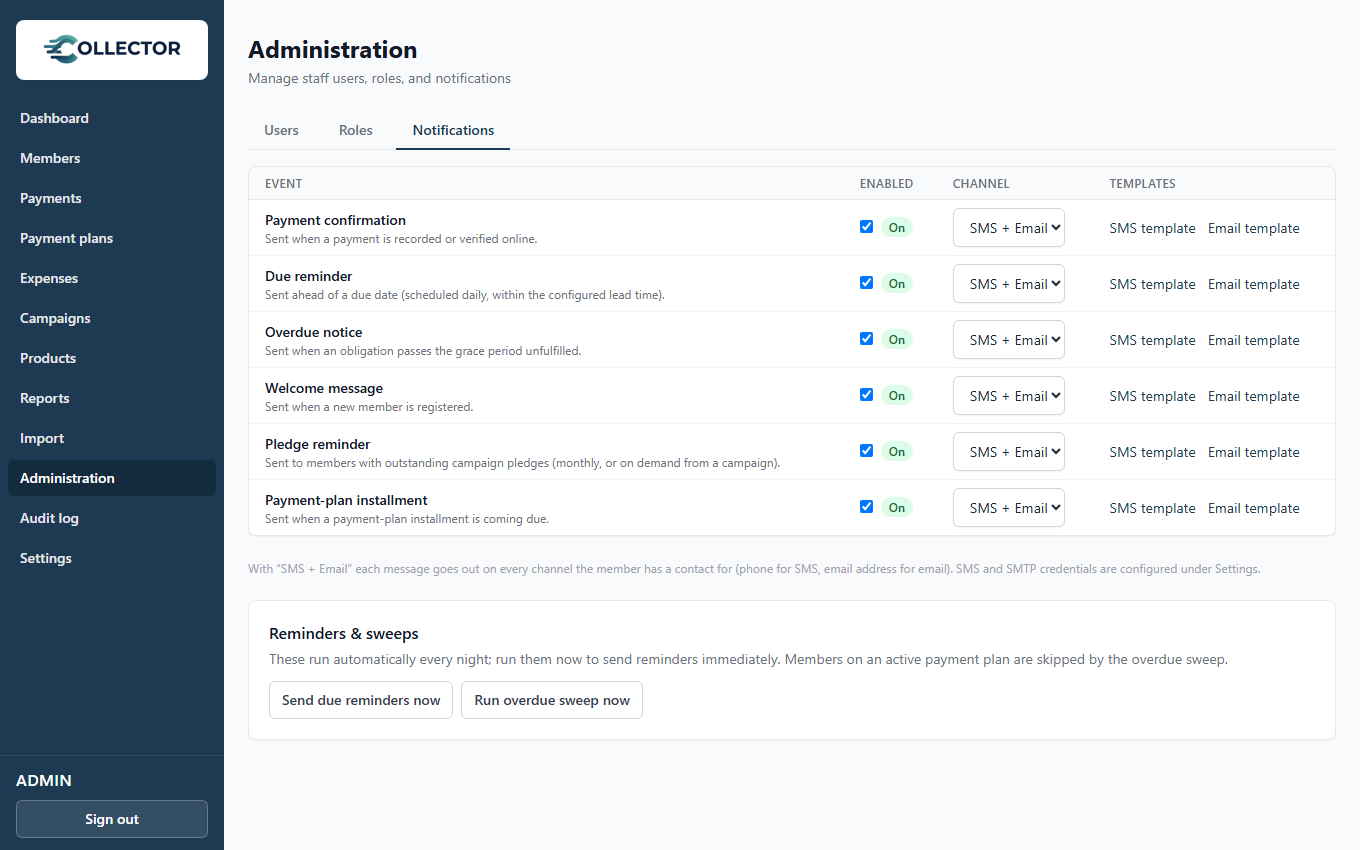
Under Administration → Notifications you control each event independently:
- Enable or disable the event.
- Channel — SMS, email, or both. With both, each member receives the channels they have contact details for (SMS needs a phone, email needs an address).
- Template — the message text, per event and channel.
Notification events
| Event | Fires when |
|---|---|
| Payment confirmed | A payment succeeds (offline or online) |
| Obligation due | The due-reminder sweep finds an upcoming unpaid obligation |
| Obligation overdue | The overdue sweep marks an obligation overdue |
| Registration welcome | A new member is registered |
| Pledge reminder | The monthly pledge sweep (or a manual Send reminders) finds an unfulfilled campaign pledge |
| Payment plan reminder | A payment plan installment is due soon or overdue |
Template placeholders
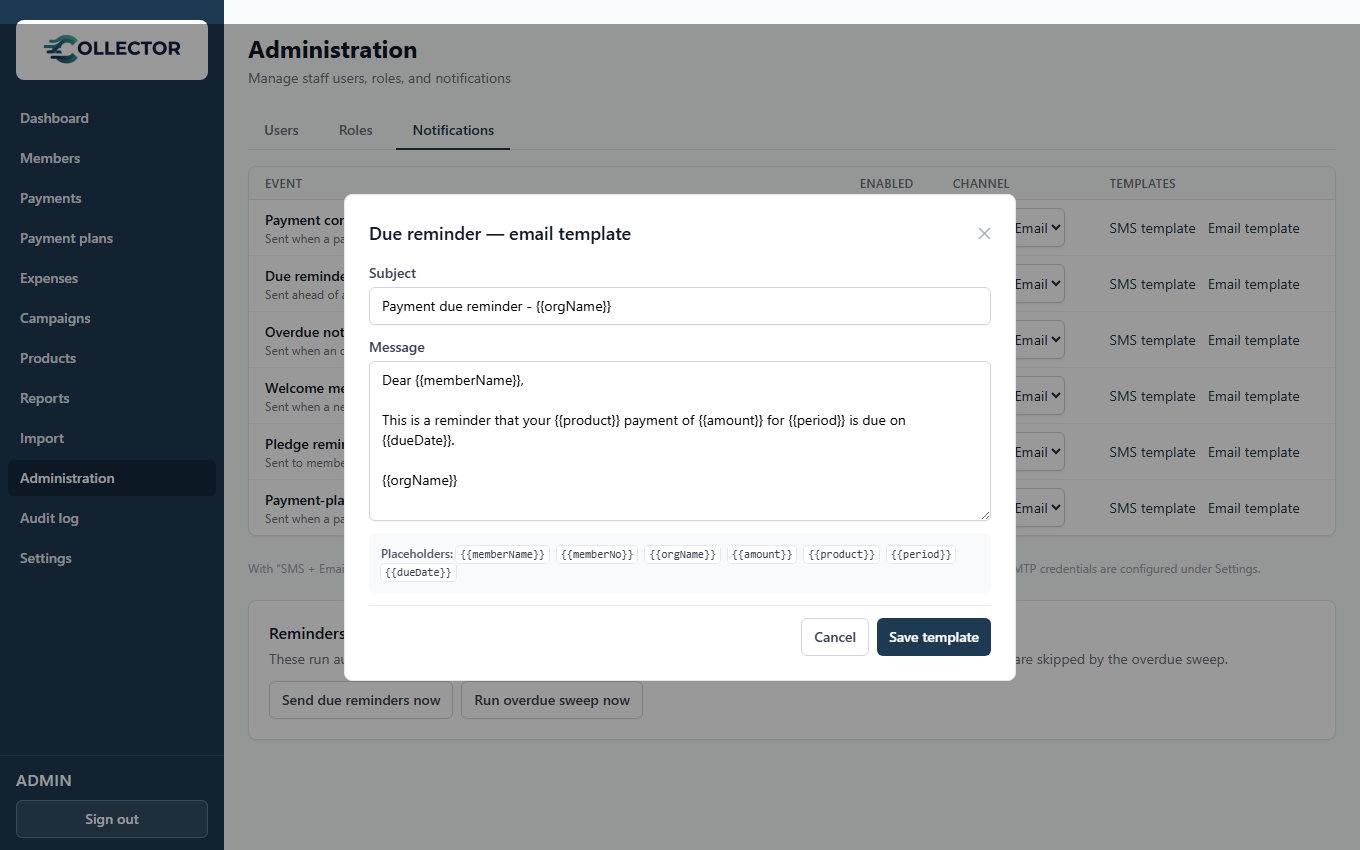
Templates support placeholders that are filled per message:
Hello {{memberName}}, your {{product}} for {{period}} ({{amount}}) is due.
Please pay at your earliest convenience. — {{orgName}}
Common placeholders: {{memberName}}, {{amount}}, {{product}},
{{period}}, {{orgName}}. The template editor lists everything available
for each event.
Delivery channels & cost
- SMS goes through your own provider account (usmsgh) using credentials you enter in Settings. You pay the provider directly at their rates — Collector adds no markup. Set a recognizable Sender ID so members know it's you.
- Email goes through your own SMTP account, also configured in Settings.
- Members can opt out per channel from their portal account page — a member who unticks SMS stops receiving SMS reminders while their email reminders (and official receipts) continue. Opt-outs never affect other members.
See Organization settings for entering credentials.
Watching arrears
- The Dashboard shows collected vs. arrears at a glance.
- Each member page lists their overdue obligations.
- The arrears aging view in Reports breaks down how old the arrears are, per product — the tool for deciding when a phone call beats another SMS.
When a member falls far behind
For members who owe several months, a one-off reminder isn't enough — you negotiate a schedule. A payment plan formalizes "GHS 50/month until cleared", and while it's active it suppresses the overdue dunning for that member in favour of gentle installment reminders. It turns the arrears list into a recovery tool rather than a shame list.
Both sweeps normally run on a schedule, but a treasurer with obligation-manage rights can trigger the overdue sweep and due-reminder sweep immediately from Administration → Notifications → Reminders & sweeps — useful for confirming who gets reminded right after setting up payment plans.